Construction Website Optimization: Full 2026 Guide

Construction website optimization is the process of improving a contractor’s site so it loads fast, reads clearly, and turns more visitors into booked jobs. It pulls together site speed, mobile design, on-page SEO, and clean conversion paths into one steady effort. Done well, a simpler and faster site quietly wins work your competitors leave on the table.
Why Trust Us on Website Optimization
At Vantura Marketing, our 28 specialists have tested 500+ landing pages and run 750+ A/B tests, so we know what makes a construction site convert. Clients see about 4.2x more leads within 90 days.
Want Help With Your Site?
Get in touch and we’ll run a marketing audit of your pages, then build a digital strategy around your service area.
What Is Construction Website Optimization?
Construction website optimization is the ongoing work of improving a contractor’s site so it loads fast, reads clearly, and turns more visitors into leads. It covers speed, mobile design, on-page SEO, trust signals, and conversion paths, all pointed at booked work.
Most construction sites get built once and then left alone for years. That’s the core problem, because buyers, search engines, and phones all keep changing while the site stands still.
Buyers now expect the same speed and polish they get from any well-built app, and they carry that expectation into every construction site they land on. When a site feels slow or dated, your first impression is already working against you.
- Faster load times on every device
- A mobile layout that works with one thumb
- On-page SEO that helps nearby buyers find you
- Trust signals like reviews, licenses, and past projects
- A clear call to action on every page
Good optimization is not a one-time redesign. It’s a habit of small fixes that add up, and it works best when your site plugs into an integrated marketing plan instead of sitting on its own.
Worth knowing: Most contractor sites lose visitors in the first few seconds, long before anyone reads about the work. Speed, clarity, and an obvious next step matter more than a bigger gallery or a flashier homepage. Fix those three first, and everything else you try gets easier.
Why Does User Experience Matter on a Construction Website?
User experience matters because visitors decide in seconds whether your firm feels trustworthy. Clear navigation, readable text, and quick access to your phone number and past work keep people from bouncing to a competitor.
Think about how a homeowner or a project manager lands on your site. They usually arrive mid-panic, hunting for one answer, and a cluttered page makes them leave.
Getting Construction Website Navigation and Architecture Right
Good site architecture points every visitor toward a call, a quote, or a project photo in as few clicks as possible. Group your pages by service, then by location, so a roofing lead and a remodel lead each find their path fast.
Residential remodelers often need homeowner-focused marketing woven into the structure itself, with clear service pages and simple menus. Keep the top navigation to five or six items, because a long menu just hides your best pages.
- Put your phone number in the header on every page
- Give each service its own page, not one crowded list
- Add location pages if you serve more than one area
- Keep the path from homepage to quote under three clicks
How Fast Should a Construction Website Load?
A construction website should load in under three seconds on both desktop and mobile. Anything slower, and you start losing visitors before your first project photo even appears. Speed shapes rankings, bounce rate, and how serious your firm looks.
Big, uncompressed job-site photos are the usual culprit on contractor sites. In our experience, cutting a site from six seconds down to under three drops the bounce rate by about 15 to 25 percent.
| Speed metric | What it measures | Target to aim for |
|---|---|---|
| Largest Contentful Paint | How fast the main content shows up | Under 2.5 seconds |
| Interaction to Next Paint | How quickly the page reacts to a tap | Under 200 milliseconds |
| Cumulative Layout Shift | How much the page jumps while loading | Under 0.1 |
These targets sound technical, but the fixes rarely are. Compress your images, drop unused plugins, and lean on caching, and even smaller contractors can hit them without a developer on staff.
Quick win: Before you rebuild anything, resize your five heaviest photos. On most contractor sites, a handful of oversized hero images accounts for the bulk of the load time, and shrinking them is often a same-day fix.
Is Your Construction Website Ready for Mobile Users?
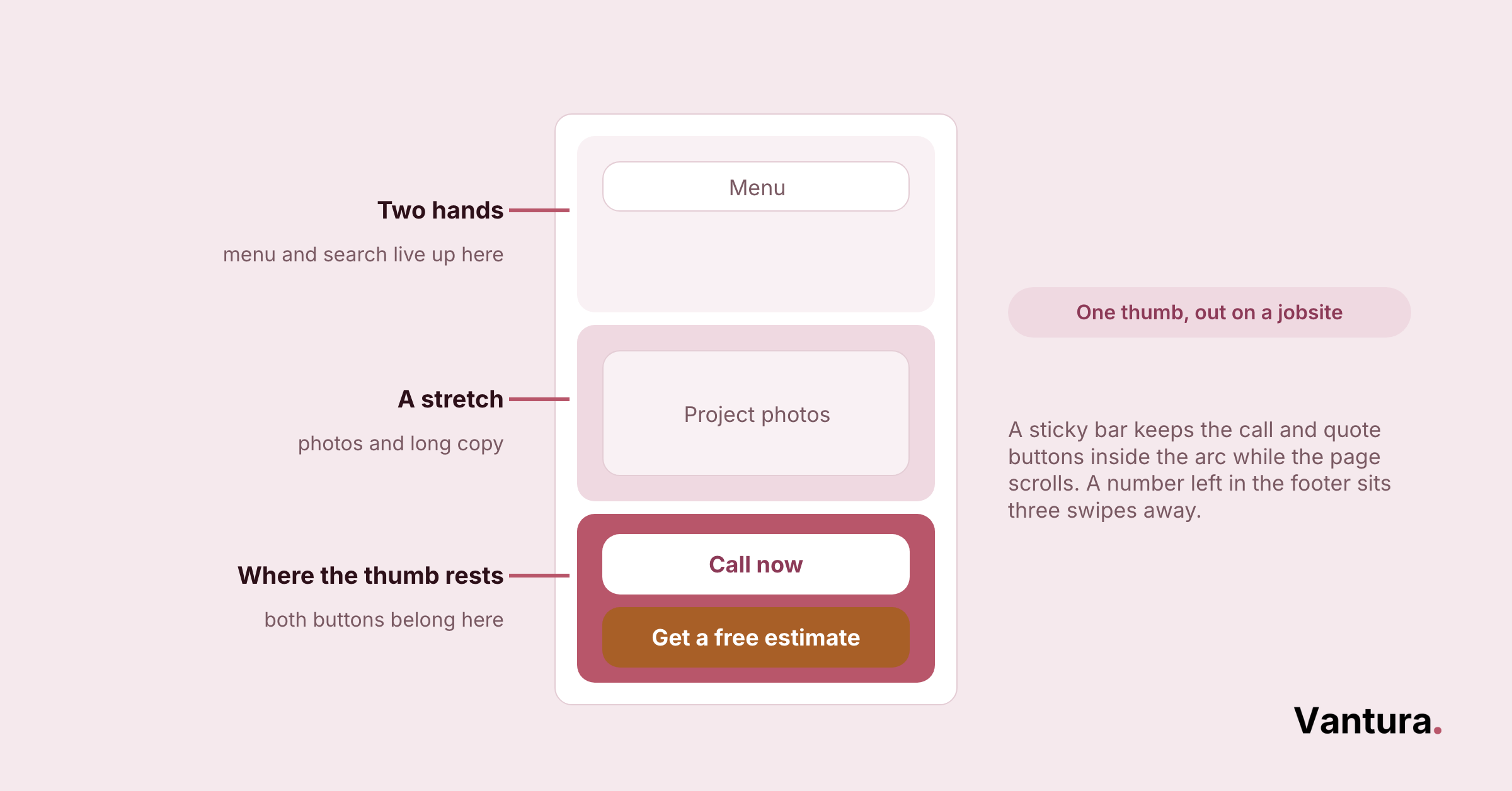
Your construction website is ready for mobile when it works one-handed, with big tap targets, readable text, and a click-to-call button that never scrolls away. Most of your traffic now comes from phones, often from a job site.
A layout that looks fine on a laptop can fall apart on a cracked phone screen in bright sun. That’s the real test for a contractor audience.
Construction Mobile Optimization and Responsive Design
Responsive design means one site that reshapes itself for whatever screen shows up. The two views below need different attention, so treat them as two jobs, not one.
- Room for wider galleries and side-by-side comparisons
- Detailed service pages and longer project stories
- Space for a visible quote form above the fold
- A sticky call button that follows the scroll
- Short paragraphs and thumb-sized buttons
- Forms cut to the fewest fields you can accept
How Do You Optimize a Construction Website for SEO?
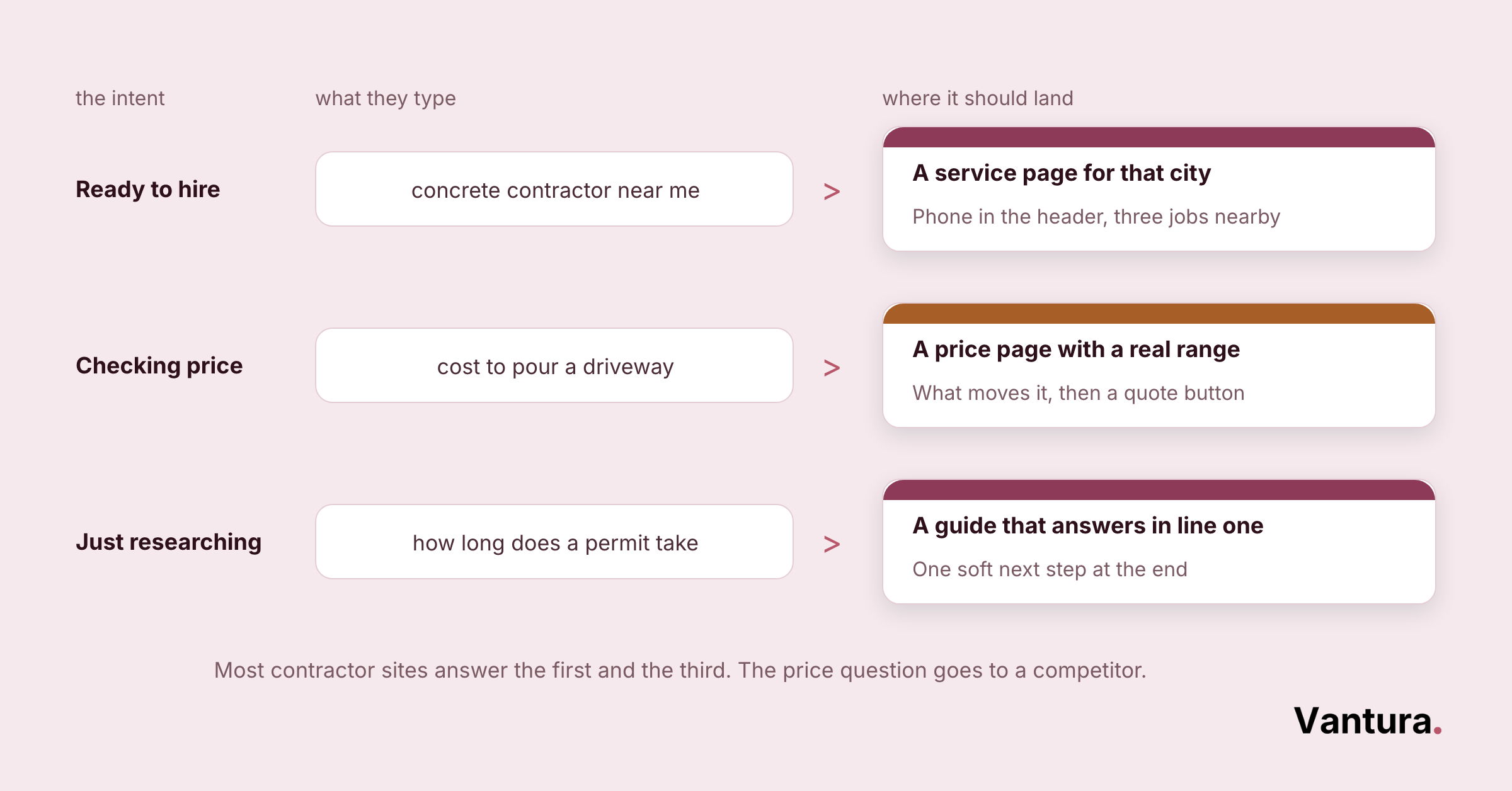
You optimize a construction website for SEO by matching each page to what local buyers search, then backing it with clean titles, fast pages, and real project content. On-page SEO is where most contractor sites leave the easiest wins sitting.
Start with intent. Someone typing “commercial concrete contractor near me” wants a different page than someone reading about permit timelines, and one page cannot serve both well.
The payoff shows up in the numbers, too. 91% of marketers said SEO positively impacted their site performance and marketing goals last year, according to Conductor, proof that this work moves real business results, not just rankings.
- Give every service and location its own indexed page
- Write plain title tags that name the service and the area
- Add real photos with descriptive file names and alt text
- Answer the questions buyers actually ask, in their words
Commercial builders chasing bigger contracts usually pair this with commercial B2B campaigns, since those buyers research for weeks before they call. Match your page depth to that longer decision timeline.
How Do You Turn Construction Website Visitors Into Leads?
You turn visitors into leads by removing friction and making the next step obvious. Conversion rate optimization is less about clever tricks and more about clearing the path, so the people already interested go ahead and reach out.
Across our projects, construction and general contracting sites often convert well under a tenth of their visitors into leads, trailing tighter home-service verticals. Closing that gap is one of the clearest wins inside a broader construction digital marketing strategy, and the three fixes below are where it starts.
Fix #1: Cut the Quote Form Down
Long forms scare people off. Across our projects, trimming a quote form from eight fields to three lifts completed requests by roughly 20 to 30 percent.
Fix #2: Make the Call to Action Impossible to Miss
One clear action per page beats five competing links. Use a single, high-contrast button that says exactly what happens next, like “Get a free estimate”.
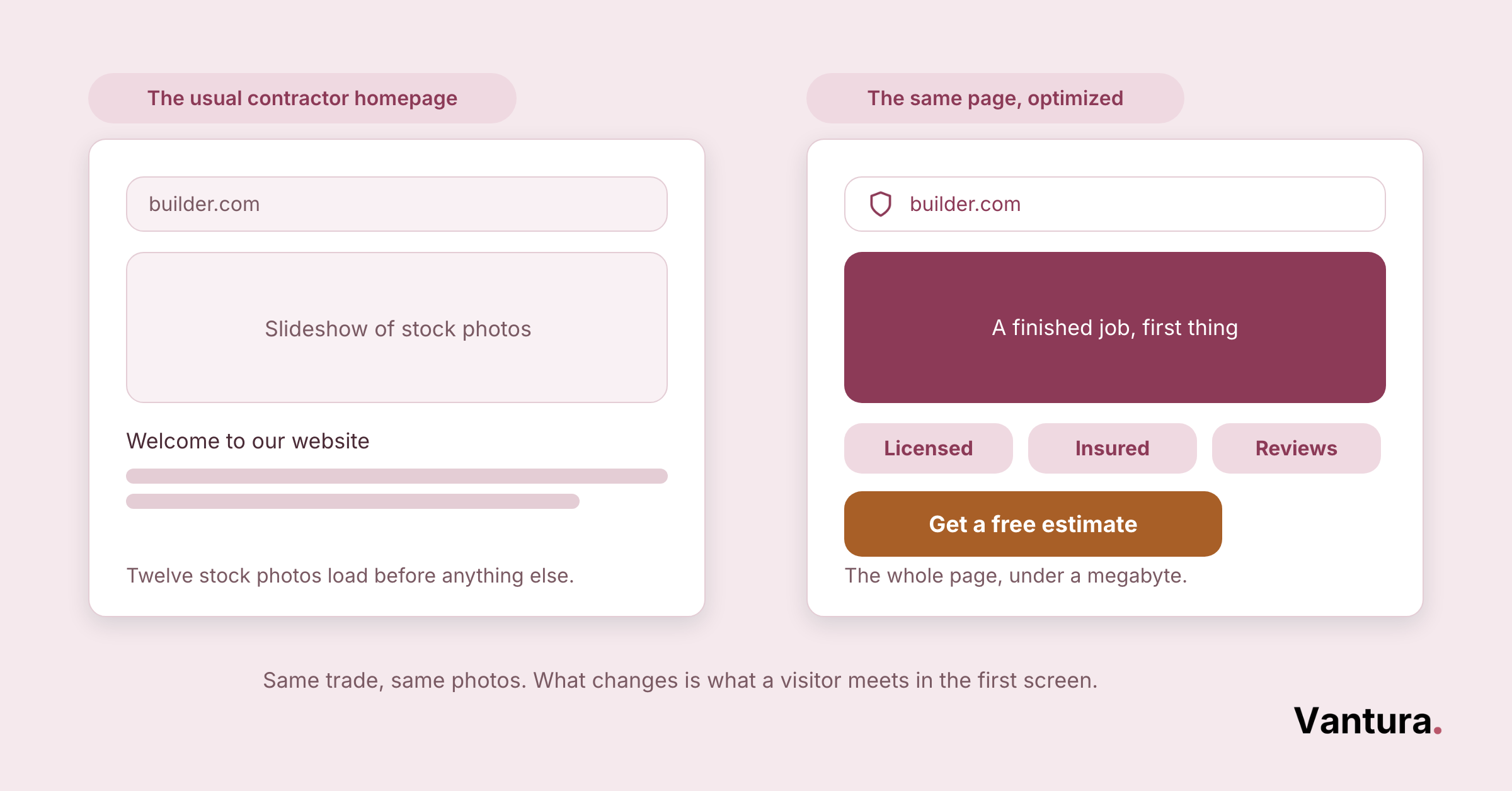
Fix #3: Show the Work Above the Fold
Buyers want proof before they scroll. Lead with a finished project photo, not a stock image of a hard hat, so the value lands in the first second.
Building Trust Signals and Social Proof
Trust signals do the quiet convincing while visitors weigh whether to call. On a construction site, they carry more weight than any headline, because the buyer is handing you a big job and their property.
| Trust signal | Why it builds confidence | Construction example |
|---|---|---|
| Reviews and ratings | Shows real customers vouch for you | Recent Google reviews with names |
| Credentials | Proves you are legitimate and insured | License number, bonding, safety record |
| Proof of work | Lets buyers picture the result | Before and after project galleries |
The same trust-first thinking drives real estate marketing, where buyers also commit large sums to people they just met online. Borrow that playbook and put your credentials where nobody has to hunt for them.
What Should You Track on a Construction Website?
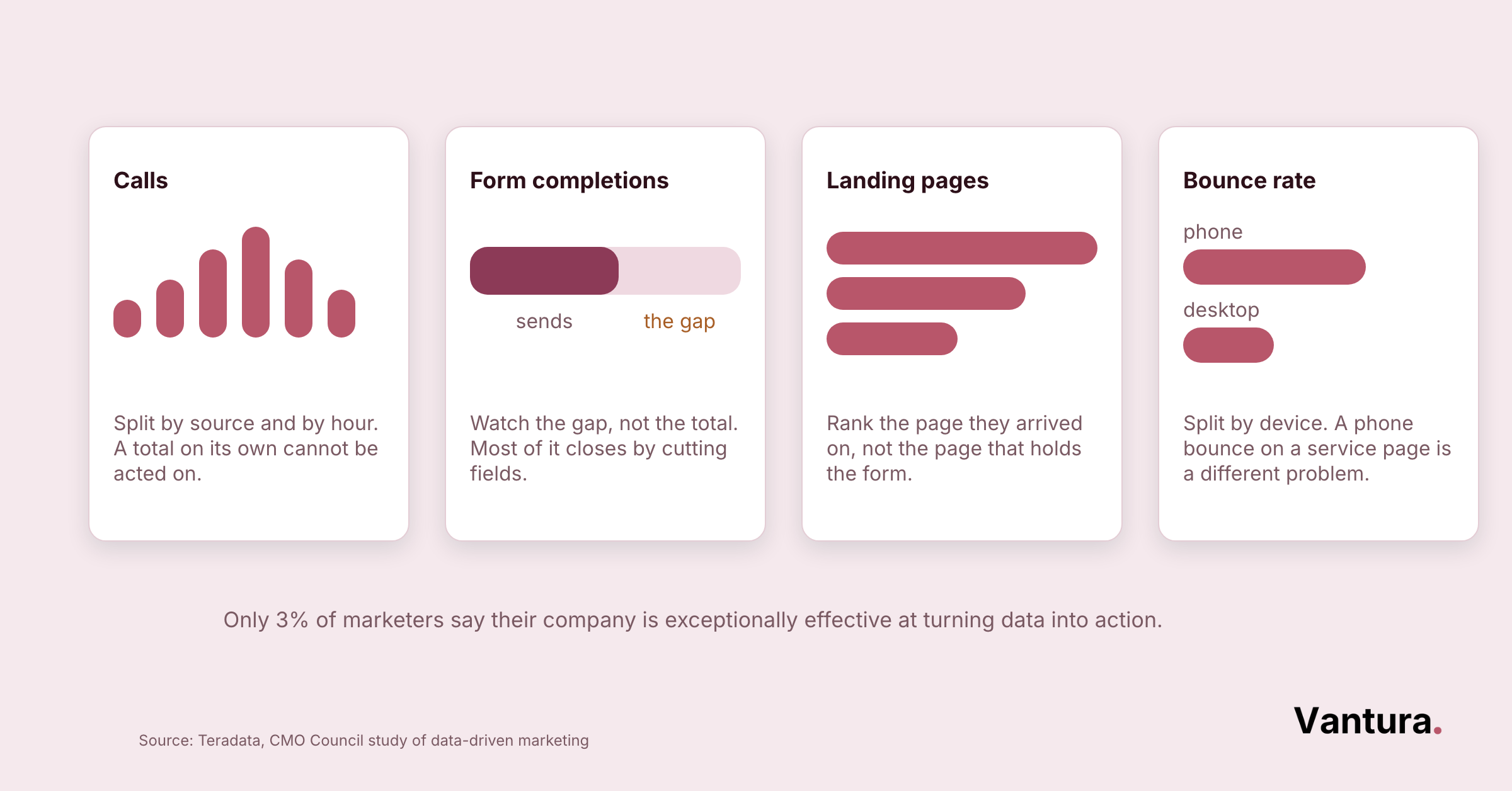
Track the numbers that tie back to jobs, not vanity counts. Calls, form submissions, and quote requests tell you far more than raw traffic, which can climb while your booked work stays flat.
- Phone calls from the site, tracked by source
- Form and quote-request completions
- Which pages people land on before they convert
- Bounce rate on your top service pages
Larger firms juggling many crews and regions often want enterprise marketing support to keep tracking clean across dozens of pages. The setup matters, because messy data leads to confident wrong decisions.
Using A/B Testing and Heatmaps to Keep Improving
Heatmaps show where visitors click, scroll, and give up, and A/B tests let you compare two versions of a page with real traffic. Together they replace opinions with evidence.
Start small and test one thing at a time, like a button color or a headline. We’ve seen a single changed headline shift form fills by 10 to 20 percent, so resist the urge to redesign everything at once.
Does Your Construction Website Meet Accessibility Standards?
Your site meets accessibility standards when anyone, including people using screen readers or keyboard navigation, can find your services and contact you. Beyond doing the right thing, accessibility widens your audience and lowers legal risk.
Most fixes are simple and also help your SEO. Clear structure and readable contrast serve every visitor, not just those with a disability.
- Add alt text to every project photo
- Keep text and background contrast strong
- Make sure forms work with a keyboard alone
- Use real headings, so screen readers can navigate
Keep in mind: Accessibility complaints against small business websites have climbed sharply, and contractor sites are not exempt. A quick audit of contrast, alt text, and keyboard navigation costs little now and heads off a costly demand letter later.
How Do You Keep a Construction Website Secure?
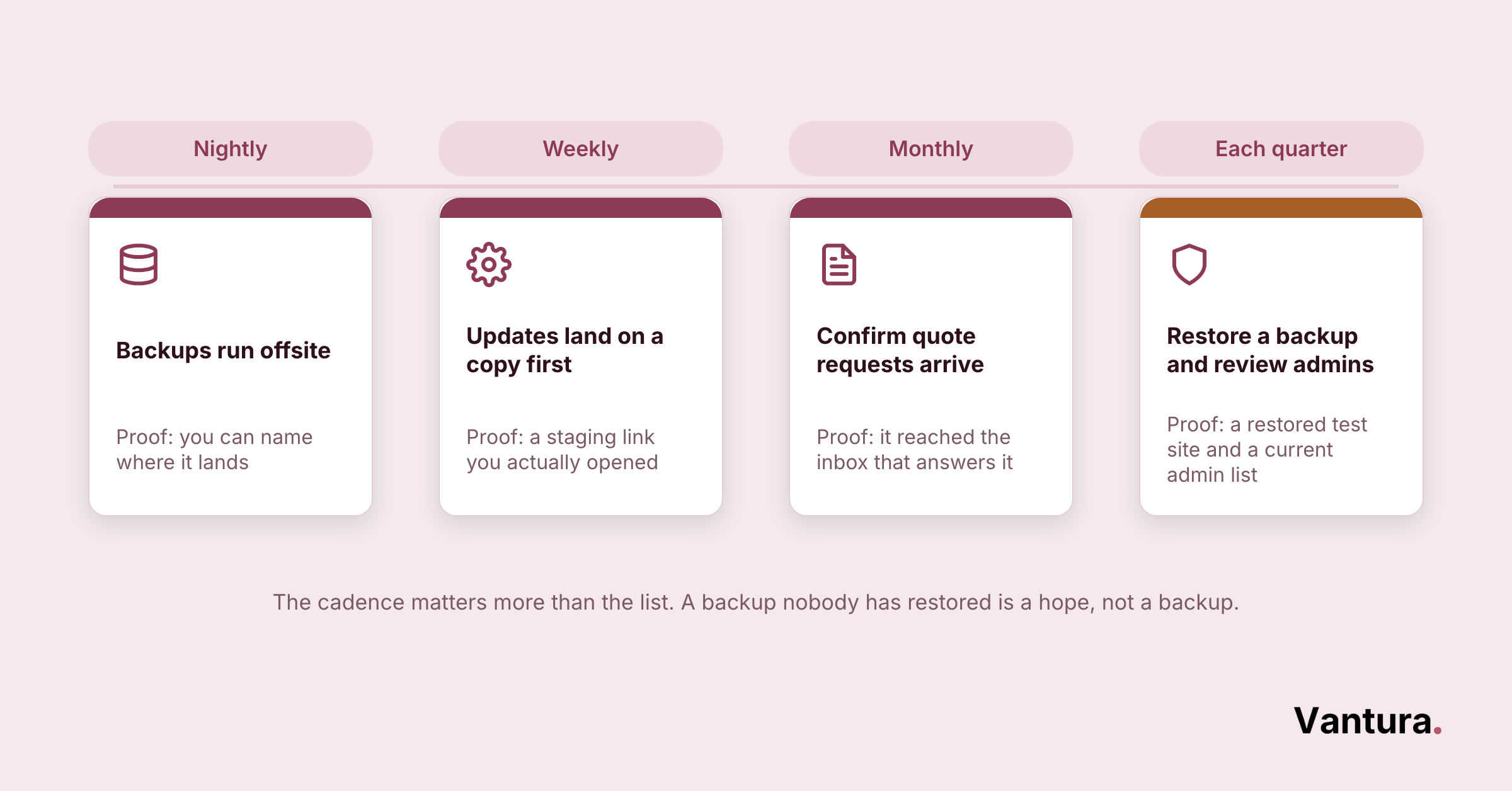
You keep a construction website secure with an active SSL certificate, current software, and regular backups. Security protects your leads’ data and your search rankings, since browsers now flag sites without HTTPS as unsafe.
A quote form collects names, phone numbers, and addresses, which makes even a small contractor site a target. Treat that data with the same care you’d give a signed contract.
- Install and renew an SSL certificate so every page uses HTTPS
- Keep your platform, themes, and plugins current on a schedule
- Run automatic backups you can restore without a fight
- Use strong logins and limit who has admin access
Construction Landing Pages: The Anatomy of a Page That Converts
A construction landing page is a focused page built around one offer and one action, with everything else stripped away. It’s where your ads and emails should send traffic, not your busy homepage.
| Element | Its job on the page | Construction example |
|---|---|---|
| Headline | Names the offer in one line | Kitchen remodels done in weeks |
| Hero image | Shows the outcome instantly | A finished project, not stock art |
| Single call to action | Removes choice paralysis | Request a free estimate |
| Proof block | Answers “can I trust them” | Reviews, license, warranty |
Landing Page Design and Conversion Copy
Design and copy work as a pair. The layout guides the eye, and the words carry the promise, so a beautiful page with vague copy still fails to book jobs.
Write copy that sounds like your crew
Skip the corporate polish and write the way you’d explain the job on site. If you also sell materials or products, ecommerce marketing tactics help those product pages convert, but the plain-spoken tone stays the same.
Landing Page CTA and Form Optimization
The call to action and the form decide whether interest becomes a lead. Keep the button loud and the form short, and never bury either below a wall of text.
Keep forms short
Ask only for what you need to make the first call, usually a name, a phone number, and the project type. You can gather the rest once you’re talking.
Landing Pages for PPC and Email Campaigns
Paid clicks and email opens are too expensive to waste on a generic homepage. Send each campaign to a page that matches its exact promise, so the message and the destination line up.
A storm-season ad for roofing companies should land on a roof-repair page, not the “about us” page. That single match often doubles the conversion rate on the same ad spend.
Mobile Landing Page Optimization
Most paid and email traffic arrives on a phone, so the mobile landing page is the real one. Test it on an actual device before you spend a dollar driving traffic to it.
Seasonal trades like HVAC contractors live and die by mobile speed during a heat wave. Load the offer, the proof, and the call button fast, or the click is gone.
When Should You Redesign or Migrate a Construction Website?
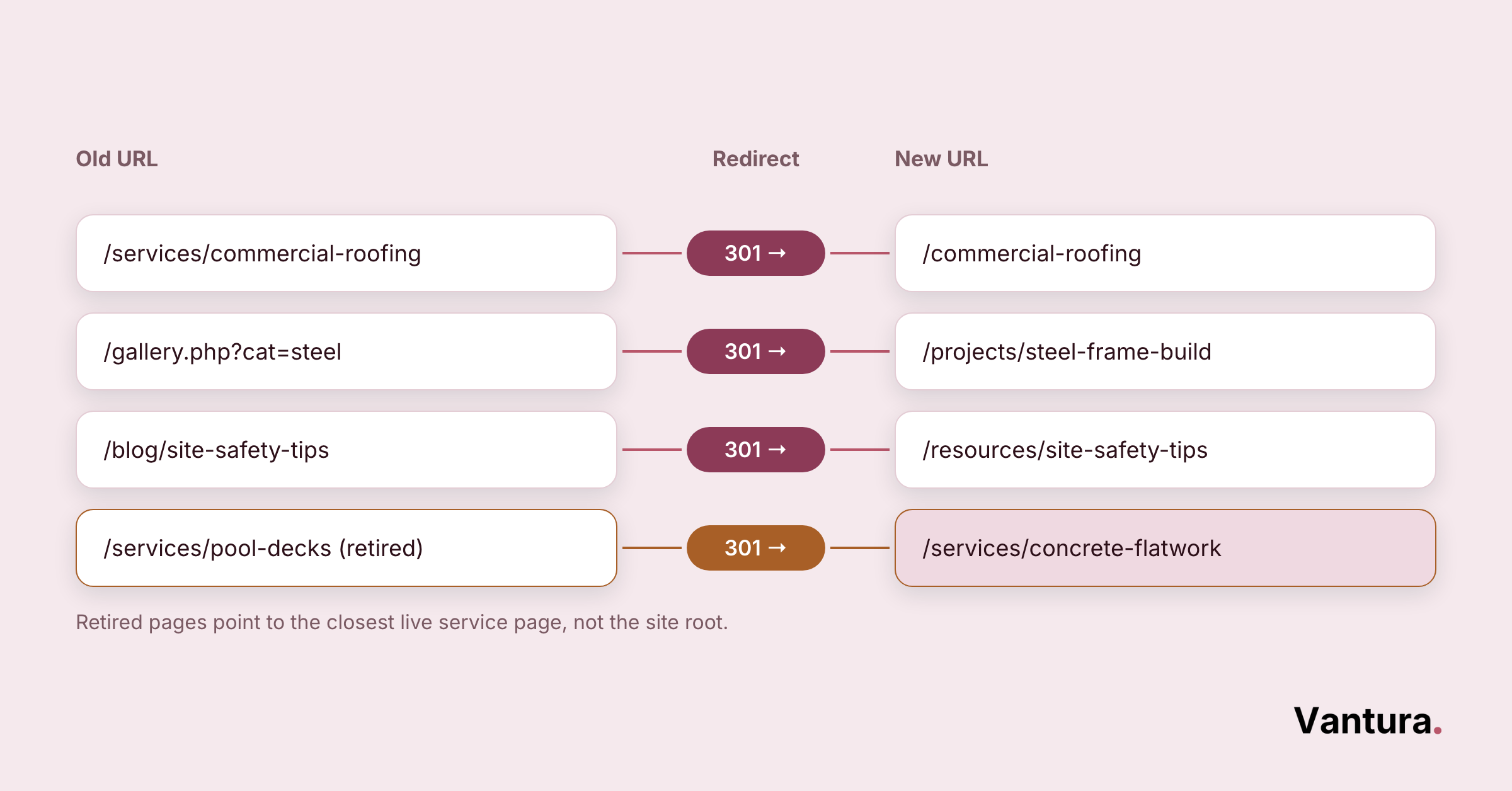
Redesign when your site is slow, hard to edit, or losing leads you can’t explain. Migrate carefully when you change platforms or domains, because a rushed move can wipe out rankings you spent years earning.
A redesign is a chance to fix the foundation, not just repaint it. Plan the move like a build, with a sequence and a punch list.
- Step #1: Record your current traffic, rankings, and top pages
- Step #2: Map old URLs to new ones and set 301 redirects
- Step #3: Rebuild for speed, mobile, and clear conversion paths
- Step #4: Launch, then watch rankings and fix broken links fast
If your team is stretched thin, it’s often smarter to outsource your marketing and the migration together. A botched redirect map is one of the few mistakes that can sink months of hard-won search visibility.
Construction Website and Landing Page Tools Worth Using
The right tools make optimization measurable instead of guesswork. You don’t need many, and most have free tiers that cover a contractor site just fine.
| Tool type | What it handles | Examples to explore |
|---|---|---|
| Speed testing | Flags slow pages and heavy files | PageSpeed Insights, GTmetrix, and similar auditors |
| Heatmaps and recordings | Shows where visitors click and drop off | Hotjar, Microsoft Clarity, and comparable tools |
| Testing and forms | Runs A/B tests on pages and forms | Broad platforms plus contractor-specific builders |
We’re an independent agency, so we point you toward the tool that fits your team and budget, including niche, trade-specific platforms, not whatever a vendor would rather sell. No vendor holds a stake in that advice.
Firms in heavy or specialized trades often lean on industrial marketing tooling for longer sales cycles. Pick tools you’ll check each week, because an unopened dashboard changes nothing.
Your Construction Website Optimization Priority Checklist
This checklist puts the fixes in order, so you tackle the ones that move leads first. Work top to bottom, and if you want a second set of eyes, marketing consulting can help you sequence it around your goals.
Speed
- Compress your heaviest photos
- Remove unused plugins and scripts
- Turn on caching and a content delivery network
Mobile
- Add a sticky click-to-call button
- Test forms on a real phone
- Size buttons and text for thumbs
SEO
- Give each service and location its own page
- Write plain, specific title tags
- Name image files and add alt text
Trust
- Show recent reviews near your calls to action
- Display license, bonding, and insurance details
- Add before and after project galleries
Conversion
- Use one clear call to action per page
- Cut forms to the fewest fields you can accept
- Match ad and email traffic to focused landing pages
Maintenance
- Keep SSL, software, and backups current
- Check your lead and call tracking monthly
- Refresh photos and reviews as jobs finish
Bottom line: You don’t have to do all of this at once. Fix speed and mobile first, add trust signals and one clear call to action next, then keep the site current. That order alone puts most contractor sites ahead of their local competition.
Disclaimer: This guide is for general informational purposes only and does not constitute professional, legal, or financial advice. Results vary by market, budget, and execution. Vantura Marketing makes no guarantee of specific outcomes and accepts no liability for actions taken based on this content.